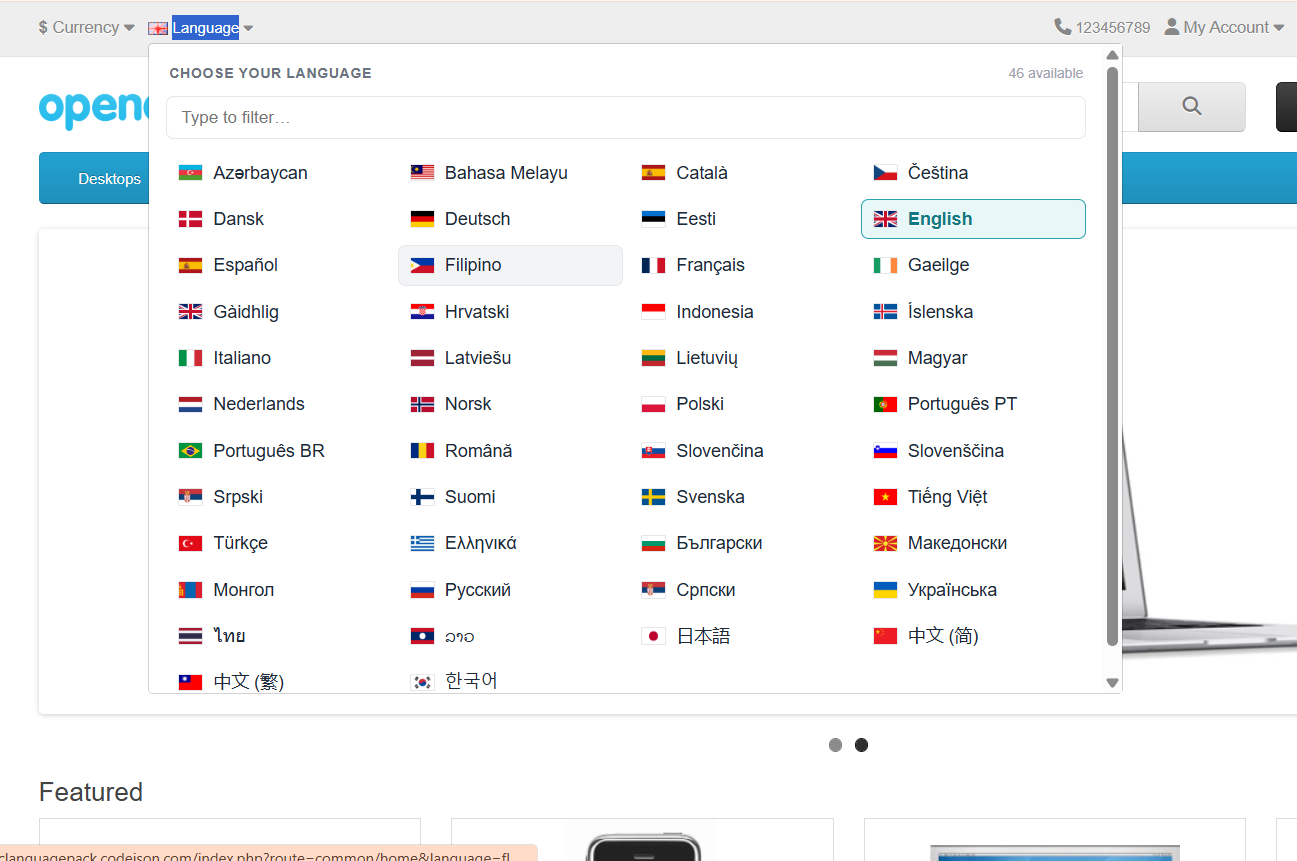
Replace the cramped default OpenCart 4 language dropdown with a beautiful modal grid of flag cards — lets your shoppers pick their language with one tap instead of hunting through a 20-item <select>.
Installs as a standard .ocmod.zip in under a minute. Works alongside every Codeison language pack. Zero core file changes, fully reversible, and designed for stores with 5+ installed languages where the stock switcher becomes unusable. Includes 7 days of post-install support and lifetime free updates.
Why stores with 5+ languages need a grid switcher
Each language shows its own flag SVG plus native name (Deutsch, Français, 日本語) — much more tappable than a dropdown.
Reads the languages table — no manual config. Add a new language pack and the grid picks it up on the next page load.
1-column on mobile, 4-column on desktop. ESC closes the modal, Tab focuses each card, Enter activates. WCAG-friendly out of the box.
Pure OCMOD — no edits to catalog/view/common/header.twig. Uninstall restores the default dropdown cleanly.
Tested against all 44 packs. Automatically uses the flag + native name that each pack registers — no extra setup.
Works with every major OpenCart theme
Tested against the default OpenCart theme plus the most popular third-party themes — Journal, Shoppica, Sellya, Fastor, Pavilion, So OpenMart, Shoppy, Pav and more. Standard OCMOD packaging means zero core file edits, so theme upgrades won't break it.
Frequently Asked Questions
Does it replace the default dropdown?
Does it work with my existing language packs?
How do I install it?
Will it affect site speed?
Does it work on mobile?
Is it keyboard-accessible?
Can I customise the styling?
Is it compatible with caching extensions?
Do I get updates?
What support is included?
Will it work with my OpenCart theme?
26 reviews
Looks polished. Modal animation is subtle, flag rendering is crisp, active-language highlight is obvious. Worth $15 easily.
Well-built. The shipping zip is small and there's nothing extra installed. Refreshing compared to bloated ext bundles.
OC4 default switcher is genuinely bad with 10+ languages. This fixes it without touching any core files.
Filter box at the top of the grid is genius. Customers type 'fra' and Français pops to the front. Big UX win.
Clean install on OC 4.0.2.3. No conflicts with our payment, shipping or theme overrides. Solid build.
Mobile experience is finally good. The single-column layout on small screens is exactly what we needed. Follow-up: held up through OpenCart 4.0.2.3 → 4.1.0.3 upgrade without changes.
Mobile experience is finally good. The single-column layout on small screens is exactly what we needed. Update after a month: still working. No log entries, no broken pages.
Great support too — answered my pre-sales question about 4.1 compatibility within an hour.
Bought it after losing a couple of conversions to the broken native switcher. ROI in week one. Recommended.
Mobile experience is finally good. The single-column layout on small screens is exactly what we needed.
Solid extension. One nit: I wish I could change the modal width via the settings page, but editing the CSS is easy enough. Update after a month: still working. No log entries, no broken pages.
Replaced our previous solution. This one's lighter and faster but I miss the search-as-you-type ranking we had before. Update after a month: still working. No log entries, no broken pages.
Auto-detects new languages I install. Added a Russian pack last week and it appeared in the grid immediately, no config.
Well-built. The shipping zip is small and there's nothing extra installed. Refreshing compared to bloated ext bundles. Follow-up: held up through OpenCart 4.0.2.3 → 4.1.0.3 upgrade without changes.
Solid extension. One nit: I wish I could change the modal width via the settings page, but editing the CSS is easy enough.
Installed in literally one minute. No admin config, no settings page — just install and done. Wish more extensions worked like this.
OC4 default switcher is genuinely bad with 10+ languages. This fixes it without touching any core files. Edit: ticket about adding a 'recently used' section was answered same-day with a CSS workaround. Appreciated.
Tab/Enter/Esc work as expected. Accessibility audit passed without complaints.
Solid extension. One nit: I wish I could change the modal width via the settings page, but editing the CSS is easy enough.
Replaced our hacked-up custom switcher with this. Same look, half the maintenance, plus the keyboard accessibility we never bothered to add.
Solid extension. One nit: I wish I could change the modal width via the settings page, but editing the CSS is easy enough. Edit: switched our 8 dev/staging stores to it too — same clean install everywhere.
Replaced our hacked-up custom switcher with this. Same look, half the maintenance, plus the keyboard accessibility we never bothered to add. Edit: ticket about adding a 'recently used' section was answered same-day with a CSS workaround. Appreciated.
Works as advertised. The modal could be slightly wider on tablets but otherwise no complaints. Update after a month: still working. No log entries, no broken pages.
Game changer for our 18-language store. The default dropdown was unusable — customers couldn't scroll on mobile. Modal grid solves it instantly.
Filter box at the top of the grid is genius. Customers type 'fra' and Français pops to the front. Big UX win.
Well-built. The shipping zip is small and there's nothing extra installed. Refreshing compared to bloated ext bundles.
Support Information
Support Period
365 days of dedicated support from the date of purchase.
Free Updates
Lifetime access to all future updates included with your purchase.
What is included in support?
- Answering questions about how to use the product
- Assistance with reported bugs and issues
- Help with included third-party assets
What is NOT included in support?
- Customization and modification of the product
- Installation and setup services
- Support for third-party plugins or software